As smartphone cameras have gotten better and better over the years, more and more people are taking and uploading more photos to the interne...

As smartphone cameras have gotten better and better over the years, more and more people are taking and uploading more photos to the internet. However, that doesn't mean every photo is perfect. Sometimes a random person in the background ruins a shot or maybe the sun pushed the contrast or the shadows out of balance. Many years ago, this would have been a big issue for anyone who was not savvy with photoshop, but those days are over.
Although users have to pay for a lot of photo editing apps there are certainly free alternatives that do the job just as well and give photoshop novices more than the sufficient number of features they need to make their photos stand out on social media.
10. PicsArt
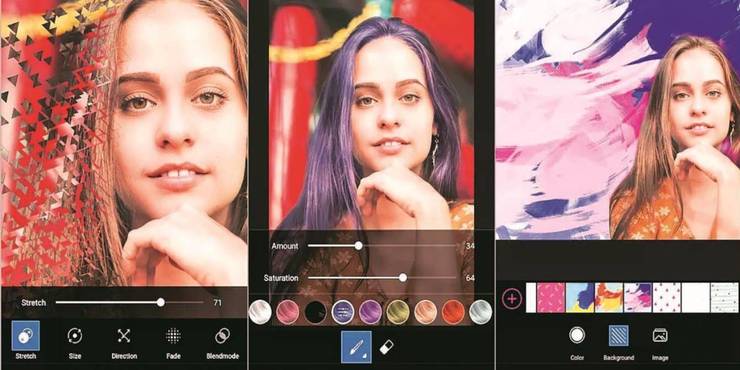
While Picsart might not have as many features as a lot of other editing apps, that is not the app's main purpose. If users want to simply jazz up the latest Instagram post with some stickers and themes then PicsArt might be the one and is available on both iPhone & Android.
It's easy to write over the image and add text and add star trails, rainbow patterns, amongst other features. This app is more about adding stickers and other custom elements on top of photos as opposed to changing specific features about the photos' properties.
9. Focos

Both iPhone and Android users that have a mobile camera that does not allow for portrait mode are in luck with Focos. Focos lets users turn any photo they want into a portrait style shot by letting them touch an area to focus on it and blur out the background.
Some iPhone cameras have this feature built into the software of the camera but for those who may have an older phone, Focos is a great alternative. As is the option with many photo editing mobile apps, there is a free version as well as an option to pay for extra features but the basic level is all you will need. Portrait mode is used by a wide range of photographers from food to travel and now it's available in the pockets of pretty much anyone with an app store.
8. Layout

Every Instagram user has posted at least one collage photo on their profile, and Layout helps do just that. Simply open the app, select the desired photos to add to the layout and the app will divide the photos amongst the canvas.
One drawback of Layout is that it only allows for a square canvas. People who want to take full advantage of Instagram's 1080x1750 max dimensions will have to use another app to get the full size image. That being said, users can edit the borders within the canvas to make one image more or less prominent whilst also zooming and cropping the photos within the segments. Layout is available on both the Apple and Android App Stores.
7. SnapSeed

If iPhone and Android users are looking for a simple photo editor that predominantly uses sliders for essentially everything, look no further than SnapSeed. While it doesn't have the biggest collection of filters, there are some unique ones.
SnapSeed also has a unique brush that allows users to edit the exposure, highlights, or contrast whatever area the brush is used on.
6. Superimpose

Superimpose is another app that is available on both apple and android platforms and has a plethora of features that makes it a dream for any photo editor. Granted, the ability to edit shadows, contrast, blacks and whites etc. is slightly lacking but the app will let users make a large number of edits between foregrounds and backgrounds.
If users need to know the exact pixel size of the photo they are editing it also displays this as they crop the photo, a feature which is lacking in a lot of editing apps these days. Superimpose also lets you add dropped shadows and mask out unwanted areas of photos. While the interface takes a couple days to get used to, once users have a handle on it, there are so many possibilities.
5. Airbrush

As the name suggests, this app is less about changing the saturation, shadows etc. and more about the airbrush tool found on most desktop photo editing apps. Other features include changing the color of someone's hair.
One other feature of the app is being able to warp facial features such as the face shape, the forehead, the color of skin. Although it can be used as a bit of a joke with some friends, there are certainly both iPhone and Android users that will find these features useful.
4. Lightroom

Adobe's legendary Lightroom is available on all mobile devices and if users have an account with Adobe, they can log in and use their presets to edit photos they take on their phone. Meaning anyone with an account can't take a photo on their phone, edit it with a preset, and instantly upload it to any social media they like.
As is the case with all the mobile versions of Adobe programmes the user interface isn't as easy to use as the desktop version but the Lightroom app does allow for a lot of ways to edit photos. Even though Lightroom went through a tough spot at the end of last year, it still remains a one of the best in its class.
3. Photos

One app that is potentially overlooked by iPhone users when editing apps is the standard Photos app that comes with every iPhone. While the older versions of this app were not known for their editing quality, the latest versions have kicked it up a notch to keep in line with Apple's high quality camera's.
With portrait mode, numerous great-looking filters such as 'Dramatic' and more detailed editing options such as brilliance, black point, and vignette, as long as users stay away from the automated editing option, there is real potential to make any photo, be it landscape, food photography or portraits, look exceptional.
2. PhotoShop Express

Lightroom isn't the only Adobe app that made its way to iPhone and Android. Adobe Photoshop Express has a lot of options and filters that is the dream for any medium-high skilled photo editor. Photoshop Express has hundreds of filters within it's library and users can also use many of Photoshop's classic features.
With red-eye, blemish removal, lens flares, adding text, preset crop shapes as well as the ability to lay photos out in a collage and edit border size and colours as well as adding shadows, there's very little the Photoshop app can't do.
1. VSCO

VSCO does have a paid premium version available, but fear not, the free version probably does 99% of what is needed for a quick and easy, but also high quality, photo editing app on apple and android phones. The paid version does allow users to edit and add filters to videos but if photos is the only thing needing edited, VSCO is a great choice.
VSCO has great filter options and even in the more detailed editing menu, users can increase contrasts, clarity, white balance, and skin tone, amongst other features, to a very high standard.


No comments